Understanding Shutter Speed
Shutter speed is one of the most important foundations of photography. Simply put, it refers to how long your camera’s shutter stays open, allowing light to reach the sensor. That length of time has a direct impact on exposure, sharpness, and how motion appears in your final image. Whether you want to freeze a fleeting moment or intentionally blur movement to create a sense of flow, shutter speed gives you that control.
Shutter speeds are measured in seconds or fractions of a second. A setting like 1/2000 means the shutter opens and closes extremely quickly, while a shutter speed of 1 second keeps the shutter open long enough to visibly record motion and light over time. Understanding how and when to use different shutter speeds is a major step toward moving from “taking pictures” to making intentional photographs.
What Shutter Speed Does
At its core, shutter speed affects two critical elements of a photograph: exposure and motion.
From an exposure standpoint, shutter speed controls how much light hits the sensor. A fast shutter speed lets in very little light, resulting in a darker image unless compensated for with aperture or ISO. A slower shutter speed allows more light to enter, brightening the image but increasing the risk of blur.
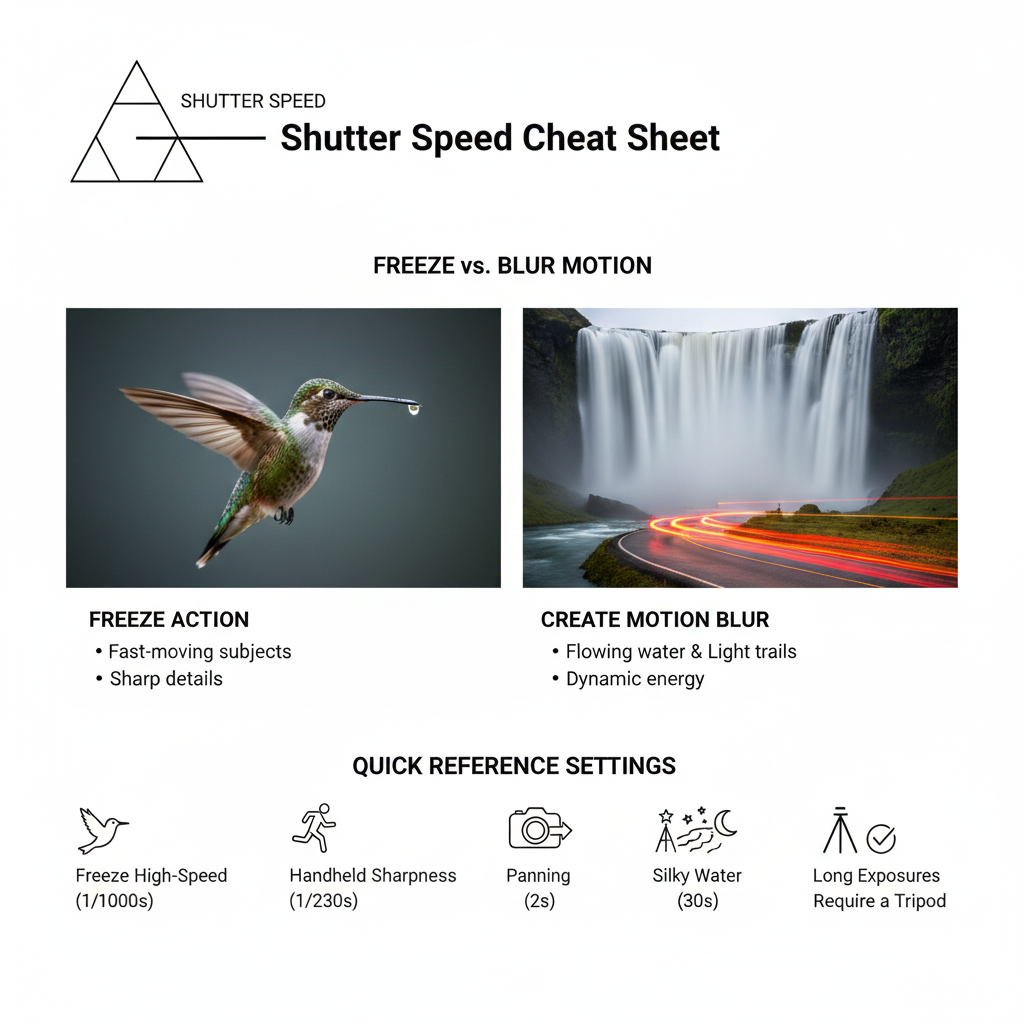
From a creative standpoint, shutter speed determines how motion is rendered. Fast shutter speeds freeze action, capturing moments that happen too quickly for the human eye to fully process. Slower shutter speeds blur motion, allowing you to show movement within a still frame. Both approaches are equally valid; the key is choosing the one that best serves your subject and story.
Shutter Speed and Exposure
Shutter speed is one side of what photographers commonly call the exposure triangle, which includes shutter speed, aperture, and ISO. These three settings work together to create a properly exposed image.
- Fast shutter speeds (such as 1/1000 or 1/2000) limit the amount of light entering the camera. They are ideal in bright conditions or when photographing fast-moving subjects, but they often require a wider aperture or higher ISO to avoid underexposure.
- Slow shutter speeds (such as 1/30, 1 second, or longer) allow more light to reach the sensor. These settings are useful in low-light situations, but they require steady hands or camera support to prevent unwanted blur.
Because changing shutter speed directly affects brightness, it’s important to balance it with aperture and ISO. Increasing shutter speed usually means you’ll need to open up your aperture or raise ISO. Slowing it down may allow you to lower ISO for cleaner images.
Quick Reference
| Subject | Recommended Shutter Speed |
| Birds in flight / Racing cars | 1/1000s to 1/4000s |
| Running kids / Street photography | 1/250s to 1/500s |
| Handheld portraits | 1/125s (minimum) |
| Panning (moving subjects) | 1/15s to 1/60s |
| Silky water / Waterfalls | 1/2s to 4s |
| Star trails / Night sky | 15s to 30s |
Freezing Motion with Fast Shutter Speeds
Fast shutter speeds are essential when photographing action. Sports, wildlife, birds in flight, children at play, and even splashing water all benefit from shutter speeds that stop motion in its tracks.
As a general guideline:
- 1/500 to 1/1000 works well for most sports and wildlife
- 1/2000 or faster is ideal for birds in flight or very fast action
Using fast shutter speeds allows you to capture sharp details that would otherwise be lost to motion blur. Facial expressions, muscle tension, and flying debris become visible, adding impact and realism to your images.
Fast shutter speeds are also helpful when shooting handheld with longer lenses, as they reduce blur caused by camera shake.
Showing Motion with Slow Shutter Speeds
Slow shutter speeds open the door to a more artistic interpretation of movement. Instead of freezing action, they allow motion to blur across the frame, creating a sense of energy and flow.
Common uses for slow shutter speeds include:
- Flowing waterfalls and rivers
- Ocean waves
- Light trails from cars at night
- Fireworks
- Crowds and busy streets
A shutter speed of 1 second or longer can transform moving water into a smooth, silky texture or turn traffic into glowing streaks of light. These effects can add drama and mood, turning ordinary scenes into compelling visual stories.
Because slow shutter speeds amplify even the smallest movements, a tripod is often essential. Using a remote shutter release or your camera’s self-timer further reduces the chance of camera shake.
Creative Techniques Using Shutter Speed
Beyond basic freezing and blurring, shutter speed can be used creatively to produce unique effects.
Panning
Panning involves moving the camera to follow a moving subject while using a slower shutter speed. The subject remains relatively sharp while the background blurs into streaks, emphasizing speed and motion. This technique works well for cars, cyclists, runners, and wildlife.
Long Exposures
Long exposure photography captures extended moments in time within a single frame. Exposures lasting several seconds or even minutes can reveal details the eye normally misses, such as cloud movement, star trails, or the subtle glow of city lights.
Light Trails
Using long shutter speeds at night allows moving light sources to create lines and patterns across the image. This technique is commonly used in urban photography and adds a dynamic element to nighttime scenes.
Experimentation is key. Small changes in shutter speed can dramatically alter the final result, so testing different settings helps refine your creative vision.
How to Adjust Shutter Speed on Your Camera
The method for adjusting shutter speed depends on your camera type, but the basic principles remain the same.
DSLR Cameras
Set your mode dial to Shutter Priority (Tv or S) or Manual (M) mode. In shutter priority, you choose the shutter speed and the camera automatically selects the aperture. Use the main command dial to adjust shutter speed, selecting faster speeds for action or slower speeds for motion blur.
Mirrorless Cameras
Mirrorless cameras function similarly to DSLRs, often with dedicated dials or customizable controls. One advantage is the electronic viewfinder, which allows you to preview exposure changes in real time as you adjust shutter speed.
Point-and-Shoot Cameras
Many compact cameras limit manual control, but scene modes such as Sports or Night can automatically select appropriate shutter speeds. If manual options are available, they are typically found in the menu system.
Learning how your specific camera handles shutter speed will make adjustments faster and more intuitive in the field.
Shutter Speed, ISO, and Aperture Working Together
Every change to shutter speed affects exposure, which means it must be balanced with ISO and aperture.
- ISO controls sensor sensitivity. Higher ISO allows faster shutter speeds in low light but increases image noise.
- Aperture controls how much light enters the lens and affects depth of field. Wider apertures let in more light, enabling faster shutter speeds.
If you increase shutter speed to freeze motion, you may need to open the aperture or raise ISO. If you slow the shutter speed, you may be able to lower ISO for cleaner images. Understanding this relationship is essential for making confident exposure decisions.
Common Shutter Speed Mistakes
One of the most common mistakes photographers make is using a shutter speed that’s too slow when shooting handheld. This often results in blurry images due to camera shake. A useful guideline is the reciprocal rule: use a shutter speed at least as fast as the focal length of your lens. For example, with a 50mm lens, aim for 1/50 or faster.
Another mistake is failing to stabilize the camera during long exposures. Even slight movement can ruin an image when the shutter is open for more than a second. A tripod, remote release, or timer can make a significant difference.
Photographers also sometimes forget to rebalance ISO and aperture after adjusting shutter speed, leading to underexposed or overexposed images. Always reassess the exposure triangle when making changes.
Practical Tips for Mastering Shutter Speed
- Use a tripod when working with slow shutter speeds
- Practice with shutter priority mode to build confidence
- Take test shots at different shutter speeds to compare results
- Review images closely to understand how motion and sharpness change
- Experiment in a variety of lighting conditions
Consistent practice is the fastest way to develop an intuitive feel for shutter speed.
Conclusion: Making Shutter Speed Work for You
Shutter speed is more than a technical setting, it’s a creative tool that shapes how viewers experience your images. Whether you’re freezing action or embracing motion blur, your choice of shutter speed plays a major role in the story your photograph tells.
By understanding how shutter speed affects exposure and motion, and how it works alongside ISO and aperture, you gain greater control over your photography. Experimentation and practice will help you recognize when to use fast or slow shutter speeds instinctively.
As you continue developing your skills, make shutter speed an intentional part of your creative process. With time and experience, it will become second nature and your images will be stronger, more expressive, and more visually compelling as a result.
Dive Deeper
📸 Photography 101: Master the basics
⚙️ Gear & Maintenance: Protect your investment
🔭 Beyond the Lens: Find your creative voice
Did you enjoy this post? If you want to keep up with my latest work, get notified when new prints go on sale, or receive more tips like these, consider subscribing to my weekly update. I send out one email every Friday to share what I’m working on and what I’ve learned behind the lens. No spam, just photography.